Your novel has threads.
See where they go.

PageWeaver lets you tag passages by character, subplot or theme, then read any thread straight through your manuscript, and follow your threads and characters across a whole series.

Not an AI writing tool.

It doesn’t write for you. It helps you see what you’ve written.

100% AI free

Chapter 3

“The practice is quiet,” said I, “and I have an accommodating neighbour. I should be glad to come.”

“Every precaution is still necessary,” he whispered. “I have reason to think that they are hot upon our trail. Ah, there is Moriarty himself.”

“It was my brother Mycroft. …

Chapter 4

… gazing down at the rush of the waters. It was the last that I was ever destined to see of him in this world.
A page of The Final Problem, from the Sherlock Holmes sample, its passages underlined in their threads’ colours: Watson and Holmes, Moriarty, Disguise, Holmes's death and return.

Watch a thread come together

  1. Type a sentence into the manuscript.
  2. Select a passage and tag it with the Moriarty thread.
  3. Open the side panel’s Threads tab and follow Moriarty’s passages through the books.
  4. Open a cast note.
  5. Back on the shelf, with the three books.

See it working on real books.

Three stories. One thread.

Moriarty is absent from the first story, central to the second, and a shadow over the third.

  1. Story 01

    A Scandal in Bohemia

    Not mentioned once. The thread hasn’t begun.

  2. Story 02

    The Final Problem

    “He is the Napoleon of crime, Watson.”

    “He sits motionless, like a spider in the centre of its web, but that web has a thousand radiations, and he knows well every quiver of each of them.”

  3. Story 03

    The Adventure of the Empty House

    “I knew that Moriarty was not the only man who had sworn my death.”

Explore the Sherlock Holmes sample

Your book stays on your machine.

No account. No upload. No installation.

PageWeaver runs in your browser and works offline. Your manuscript is stored on your own computer, not on our servers.

On a shared or university computer, use Back up to save your book to a file before you log off. Some shared machines clear the browser when you do.

Make the cover.
Make the book.

  • Ebook covers sized for Kindle, Apple Books, Kobo and more.
  • Paperback covers: front, spine and back in one wrap, at UK and US trim sizes. Spine width worked out for you.
  • A print-ready inside: margins, page numbers, chapter openings, title and copyright pages, ready for IngramSpark, Lulu or your local printer.
  • A font library, with every font’s licence recorded.

Then export as EPUB, Word or PDF.

One book. One place. No artwork generator.

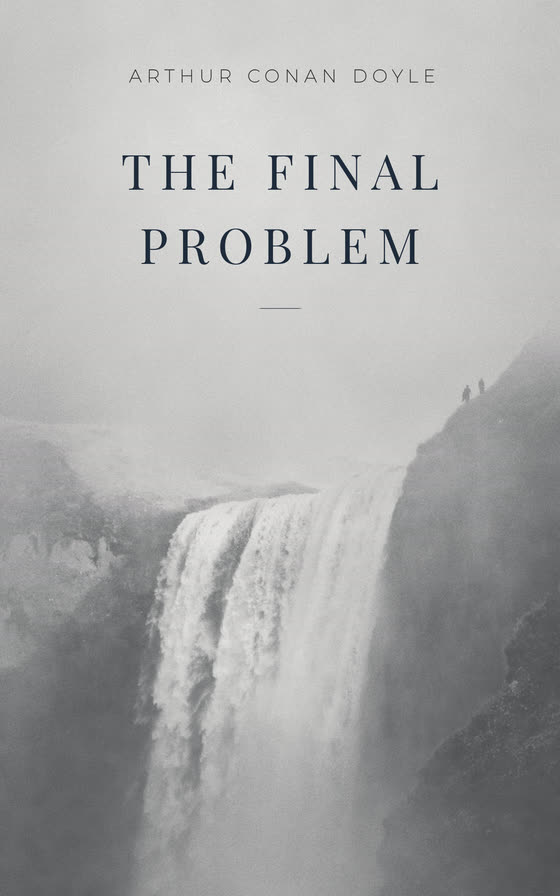
An ebook cover for The Final Problem, by Arthur Conan Doyle: the title in dark capitals over a misty grey photograph of a great waterfall, with two small figures on the clifftop above it.
Made in PageWeaver’s cover designer, for the sample’s The Final Problem. Photograph by Dylan Gialanella via Unsplash; figures from Freerange Stock.

If you teach or study writing, you’re invited.

Students and lecturers with an academic email (.ac.uk, .edu, .edu.au, .ac.nz) get the complete version of PageWeaver free, confirmed by email once a year, for up to five years. Lecturers can renew. Most universities worldwide are recognised automatically; if yours isn’t, ask us to add it.

We’ll email a link to that address to confirm it’s yours. We use it only for your PageWeaver access. See our privacy notice.

The only writing tool inviting you in.

No trial. No reduced feature set. No student writing leaving the machine.

Pricing

For everyone else:

£95 once, including every update to version 1or £5 a month

Try it free for 30 days. Everything included.

Secure checkout by Stripe, sold through Onelink. Your licence arrives by email straight after payment. No account needed.

Terms · Refunds

Questions and answers

Getting started

What is PageWeaver?

A novel-writing app that runs in your web browser. Write in chapters, tag passages by character, subplot or theme, then read any thread straight through to see whether it holds up. When the book’s done, make the cover and export it for ebook or print. It isn’t an AI writing tool.

Do I need to install anything or make an account?

No. Open app.pageweaver.studio and start writing. There’s no account and nothing to download.

Which browsers and devices does it work on?

PageWeaver is made for a laptop, desktop or tablet; phones aren’t supported. To make a print-ready book, use Chrome or Edge: other browsers may not keep the page size.

Does it work offline?

Yes. Once you’ve opened it, PageWeaver works without a connection. A subscription needs to go online now and then to stay active.

Is there a free trial?

Yes: 30 days with everything included, from the first time you open PageWeaver in a browser. No card is needed. When it ends, you can still open, edit and back up everything you’ve written, and export it as Word or PDF. New books, covers, EPUB files and print books wait until you buy.

Your books

Where is my writing stored?

In your own browser, on your own computer. It’s never uploaded to us, and we can’t see it. See our privacy notice.

How do I keep it safe?

Use Back up all books regularly and keep the file somewhere safe. Clearing your browser’s data, or a shared computer that wipes itself, removes what’s stored there, and we can’t recover it.

Can I use it on more than one computer?

Yes, on any of your own. Back up all books on one and import the file on the other: that backup carries your licence with it.

I’m on a shared or university computer.

Back up before you log off, and import the file next time. Before you go, the Licence panel can remove your licence from that browser. On a family computer, give each writer their own browser profile: everyone using one profile sees the same books.

What can I export?

EPUB, Word and PDF. You can also make a print-ready PDF of the inside of your book for IngramSpark, Lulu or a local printer, a paperback cover with its spine, and ebook covers sized for Kindle, Apple Books and Kobo.

My work or university network blocks the site.

Ask your IT team to allow pageweaver.studio and app.pageweaver.studio. PageWeaver is writing software, and none of your writing is stored on our servers.

Buying

What are the options?

£95 once, including every update to version 1, or £5 a month. Prices include VAT.

What if I already subscribe and then buy the £95 licence?

Your subscription ends at the end of the month you’ve paid for, so you won’t be charged again. We email you to confirm it.

I have free academic access. Do I need to buy?

Not while it lasts. Buy only if you want to keep going after it ends: a £95 licence bought now carries on from there. A monthly subscription is charged from the day you start it.

How do I cancel my subscription?

In PageWeaver, open the Licence panel (the ⚙ menu) and choose Manage subscription, use the Manage subscription button in your licence email, or go to pageweaver.studio/manage. It runs to the end of the month you’ve paid for, then stops.

Can I get a refund?

For the £95 licence, yes: email us within 30 days of buying for a full refund, no questions asked. You can cancel a monthly subscription at any time, but we don’t refund part of a month. See refunds and cancellation.

Why does my bank statement say LINK.COM or ONELINK?

Checkout is by Stripe, sold through Onelink. On your card or bank statement, the payment is a charge from Link (Stripe’s checkout service), shown as LINK.COM* PAGEWEAVER or ONELINK* PAGEWEAVER.

Where are my receipts and invoices?

Link, Stripe’s checkout, emails a receipt after each payment. Subscribers can also download every invoice from Manage subscription.

I’ve lost my licence.

In the app, open the Licence panel and ask for it to be sent again, to the email address you bought with.

Can I share my licence?

No. A licence is for the person who bought it, on any of their own devices. See our terms.

Students and lecturers

Which email addresses count as academic?

Addresses ending .ac.uk, .edu, .edu.au or .ac.nz, and most universities worldwide, are recognised automatically. Personal addresses (Gmail, Outlook and so on) and alumni addresses aren’t accepted.

My college or university isn’t recognised.

Ask us to add it with the request form. A person reads every request. Once we add it, everyone there with a college or university address is recognised. Further education colleges are welcome too: if yours isn’t recognised, use the request form.

How long does free access last?

A year at a time, confirmed by email once a year, for up to five years. We’ll email you before it runs out.

I’m a lecturer.

Lecturers can keep renewing after the five years. When they’re up, the email has a link to ask; once we’ve confirmed you teach, you keep it, confirmed by email once a year.

Still stuck?

Email hello@pageweaver.studio, or see Contact. A person reads every message.